
Delphi/CB
•  Greatis •  Security •  AppDatabase •  Utilities •  Visual Basic • .NET •  just4fun
Delphi / C++ Builder
Components, utilities and tips for Delphi and C++ Builder developers
Main features
  • Compatibility with Delphi 2007!
  • Easy-to-use
  • Customizable view
  • Customizable behaviour
  • VCL-compatible file and stream formats
  • IDE-compatible clipboard operations
  • ActiveX and frames compatibility
  • Component palette functions
  • Ready-to-use edit dialogs
  • DFM Extractor
  • Control Designer
  • more features...
    More...
    Publications
    FAQ
    Download
    Order
    See also
    Related products
    Ultimate Pack  hot!
    Image Editor  new!
    Runtime Fusion
    Object Inspector
    Print Suite Pro
    Commented Image
    Delphi Toys
    WinDowse
    Delphi Bonus
    TMS Scripter Studio
    Form Designer VB
    Form Designer .NET

    Related links
    Win32.hlp online version new!
    MegaDetailed.NET
    Delphi Tips
    Outsourcing

    Special
    Free Software Promotion
    Offers for Resellers
    Our clients
    Alventis
    Home Download Order FAQ Support  
    Form Designer - Customizable Behaviour
    Form Designer has 3 key features which allow to control the editing process:


    1. Locking
      When control is locked, it can be selected, but cannot be moved or resized. The locked controls selected by the grab handles of the different color (by default gray filled).
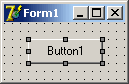

    2. Transparenting
      When control is "transparent", the mouse clicks on this control are transferred to the parent control, so you can edit your complex controls (i.e. group box with other controls within) as single control. In the image below the user clicks on the "transparent" Button1, but the GroupBox1 is selected and moved instead.
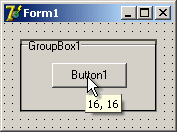

    3. Protecting
      When control is protected, this cannot be selected, moved and resized by Form Designer. Independently from the activity of Form Designer protected controls work as usual. The image below show the designed button at the right and the protected edit at the left, so user can move and resize the button and edit the button caption on the same form at the same time.
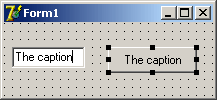
    To make control locked, transparent or protected just add the control name into the appropriate list (LockedControls, TransparentControls or ProtectedControls). You can do it at runtime from your code (these lists are TStringList) or at design time by the editor called by the double click on TFormDesigner component.
    Hot Offer
    Save your money!
    Newsletters
    Subscribe to our news!    Subscribe to our news!

    Greatis Software Greatis | Security | AppDatabase | Utilities | Delphi/CB | Visual Basic | .NET | just4fun

    Contacts | Add to Favorites | Recommend to a Friend | Privacy Policy | Copyright © 1998-2008 Greatis Software