
Delphi/CB
•  Greatis •  Security •  AppDatabase •  Utilities •  Visual Basic • .NET •  just4fun
Delphi / C++ Builder
Components, utilities and tips for Delphi and C++ Builder developers
Main features
  • Compatibility with Delphi 2007!
  • Search windows by text, class name or kind (window or control)
  • Internal list of found windows
  • OnAllowAdd and OnAdd events for tracking the search process
  • VCL-friendly TWindow class to access any information about any window
  • Windows tree example code in the demo project
    See also
    Related products
    Ultimate Pack  hot!
    Image Editor  new!
    Runtime Fusion
    Form Designer
    Object Inspector
    Print Suite Pro
    Commented Image
    Delphi Toys
    WinDowse
    Delphi Bonus
    TMS Scripter Studio
    Form Designer VB
    Form Designer .NET

    Related links
    Win32.hlp online version new!
    MegaDetailed.NET
    Delphi Tips
    Outsourcing

    Special
    Free Software Promotion
    Offers for Resellers

    Blogspot  greatis.blogspot.com
    Our clients
    Alventis
    Home Download Order Support  
    Window Information
    Window Information Component
    for Delphi 3,4,5,6,7,2005,2006,2007 and C++ Builder 3,4,5,6
    version 1.0, May 14, 2007
    Window Information (TWindowInformation component) allows you to find any window in the system and analyze it with VCL-friendly TWindow class which allow to access any window data with simple VCL-friendly properties, like Left, Top, Width, Height, BoundsRect, Text, Icon, WindowState, StayOnTop, etc.

    All you need to find the window is to set the search parameters (SearchText, SearchClass and SearchKind properties) and to call the Refrech method. The OnAllowAdd and OnAdd events will be fired for each found window. After finishing the search process all the found windows will be present in the Windows array-type property as TWindow objects.

    Forget about WinAPI calls to obtain low-level information about the window present by its handle - now you can create single TWindow object with the window handle passed to constructor and access any information by properties of this class in clear VCL style:

    uses WinInfo;
    ...
    with TWindow.Create($D0260) do
    try
      if Visible and Enabled then WindowState := wsMaximized;
    finally
      Free;
    end;
    
    Controlling the non-VCL windows never was so simple!


    Window Information suite includes demo project that demonstrates main features of TWinInfo component:
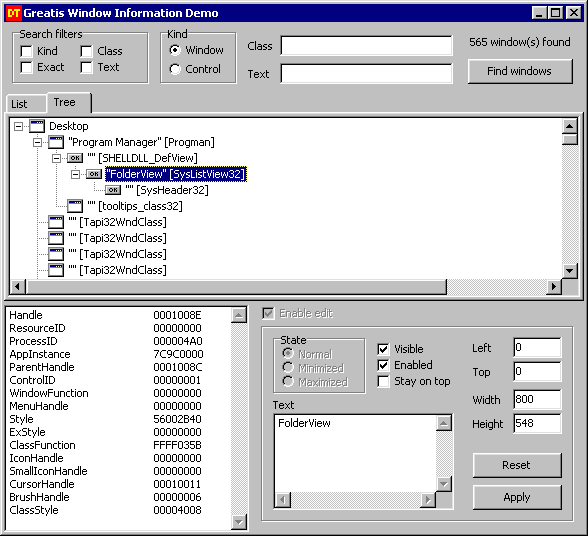
    Window Information Demo

    Window Information can be ordered separately or as a part of Delphi Toys component pack.

    Hot Offer
    Save your money!
    Newsletters
    Subscribe to our news!    Subscribe to our news!

    Greatis Software Greatis | Security | AppDatabase | Utilities | Delphi/CB | Visual Basic | .NET | just4fun

    Contacts | Add to Favorites | Recommend to a Friend | Privacy Policy | Copyright © 1998-2008 Greatis Software

    eXTReMe Tracker