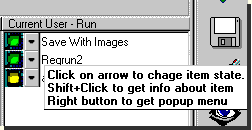
Pause/resume items
You may suspend running of the program, however do not delete it. Select an item and click on its arrow to change the item's state. You will see a popup menu.
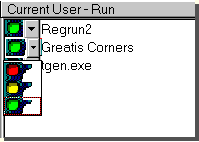
Select yellow light and click left mouse button (if you choose the red light, you will delete the item). After that, item light of changes to yellow and you will see item moved to the bottom of the list. RegRun shows green items before yellow items.
RegRun uses an algorithm compatible with Microsoft technology for suspending programs. If you have Microsoft Windows 98, you may run the System configuration utility and see that the item shows it has paused. However, RegRun works on Windows 95 and Windows NT 4.0. Those operating system's do not have a suspend feature.
You can easily pause or resume an item. If you use the keyboard, press CTRL+Enter and you will see a menu. Press Enter to change then item state.
You must restart computer to make changes.