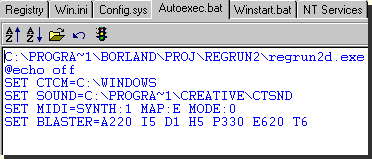
Autoexec.bat page
Autoexec.bat is an especially important file for MS-DOS. In Windows 95 and Windows NT, this file is less used and exists only for backward compatibility. However, you may run some programs before loading the Windows GUI. Inspect this file carefully. We recommend the using a minimum number of programs in autoexec.bat.
Check all the files that you need.
· If you want to enlarge the font in the window, click on icon with an up arrow. You need to select the "Configuration" feature to make the size and font persistent in the editor.
· When you find a row you no longer need, stay on it and click the traffic-light icon. You will see "rem " before the item. OK, this program is paused and it does not load with your next start of the computer. To resume click on the traffic-light icon again, or delete "rem " manually. We recommend that you proceed carefully and do not delete any lines. Remark it!
· To undo last changes, click on the reverse icon or press CTRL+Z. Only one change will be undone!
· If you want to insert a new program click on the open icon.
· You may use the clipboard with the editor.
To copy - CTRL+C or CTRL+Insert.
To cut - CTRL+X or Shift+Del.
To Paste - CTRL+V or Shift+Insert.
Don't forget to save your changes!
Press F2 or click the diskette icon to save.
RegRun warns you if you try to exit without saving your changes.