
|
Medichi.exe, murka.dat, medichi2.exe rootkit under a microscope
Medichi rootkit is
spread by e-mail or via infected web sites using Internet Explorer
Windows
vulnerability.
Medichi uses several rootkit
methods at the same time to deep hide the rootkit and make removal
process harder.
Most of antivirus and anti-spyware programs can detect part of the Medichi rootkit
but it usually comes back immediately after reboot.
Infection symptoms:
A user of an infected computer can be surprised by the strange hard
disk activity. Suddenly the file copy dialog will be displayed on the
screen.
Medichi copies a large number
files of the Windows system folder to the temporary folder and after that
immediately deletes those
files.
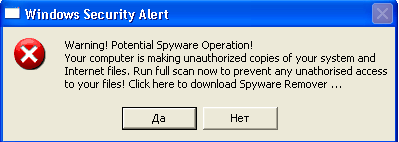
In addition Medichi shows
the warning:
Medichi tries to download fake Spyware Remover supposedly to resolve
the problem.
Of course, Medichi will not delete himself.
The false antispyware software will ask the user to pay money for the remove malware.
How Medichi rootkit works?
Immediately after executing Medichi
turns off Windows File Protection service to replace
the standard Windows beep.sys driver.
Beep.sys is used only to make simple "beep" sounds even if no sound card
is
installed.
Windows works absolutely correct without beep.sys driver.
The standard beep.sys is 4224 bytes in size.
The infected beep.sys is about 37 Kbytes.
The copy of the beep.sys, located in the C:\WINDOWS\system32\dllcache is
replaced too.
Windows File Protection Service starts again after reboot.
Medichi restarts infected
computer and takes the control of it by using the moment when Windows
automatically starts the "beep.sys".
The rootkit-beep installs a
notify routine for detecting the opening of
each process.
Medichi
waits for notification of "winlogon.exe"
process being loaded.
This is required for 2 reasons:
1) Hiding the changeof the registry
startup keys under winlogon.exe.
2) Making sure that the "Software"
registry hive is already loaded.
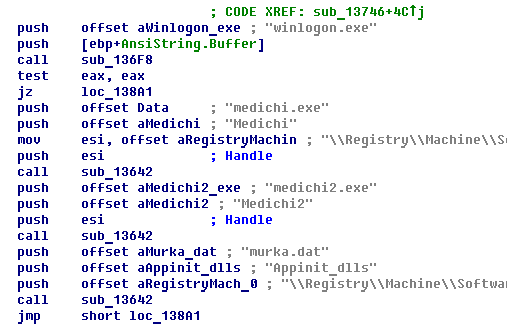
We can see on the disassemled listing of the Medichi driver here, that
rootkit installs "medichi.exe" and "medichi2.exe" to the
HKLM\Software\Microsoft\Windows\CurrentVersion\Run.
The executable files are used to notify users about spyware attack
and to download new versions.
Also, it tries to turn off some firewall and antiviral tools.
"Murka.dat" is inserted into the "Appinit_dlls" registry value.
Windows automatically loads DLLs listed in the "Appinit_dlls" into the memory of each
new process.
Murka.dat is a user-mode rootkit to hide rootkit files on the disk.
Infected beep.sys creates the "medichi.exe",
"medichi2.exe", "murka.dat" in the Windows folder, "user32.dat" in the Windows\System32
folder.
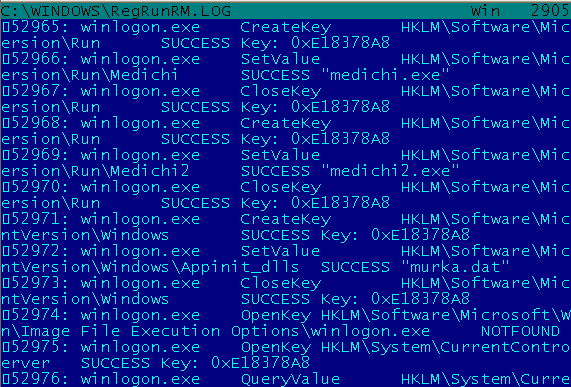
On the registry monitor listing we can see that the "winlogon.exe"
creates the registry values before the moment when the process is fully
started.
On the picture we can see that "winlogon.exe" did not get
control when it changed the registry.

It gives us an idea that
the rootkit works from the driver loaded before Windows logon process.
The Microsoft Signature Verifier
tool (sigverif.exe) can easily check for the files signed by
Microsoft digital sign.
Beep.sys was detected as well.
It isn't encrypted and the signal words "medichi", "murka.dat" can be
easily read.
We know that Medichi
rootkit was written by Russian speaking virus writers.
Murka is a one of the favorite cat names in Russian.
The text "bljaha muaha zainalo vse!" is actually swear words.
|