
Security
•  Greatis •  AppDatabase •  Utilities •  Delphi/CB •  Visual Basic • .NET •  just4fun
RegRun Security Suite
Not an antivirus. A powerful tool kit against Trojans, viruses, spyware, adware and rootkits
One-click purchase
RegRun NIVA Platinum - Rootkit Killer

NIVA+CD-ROM

More info:
Know more?
Screenshots

FAQ

On-line manual

Print PDF

Download trial
RegRun NIVA Platinum
Forums
Greatis Forum

NI Forum

Mickey Forum

Thank you!

International
Download Russian

Download Ukrainian

Join our localization team

Home Download Order Support   Newsletter Your shopping cart ?
Specify an order for startup programs

Can I specify the order of my Startup items?

Yes, most definitely!

RegRun Start Control allows you to specify any order for your startup programs and enables you to control the way they are processed.

Windows processes a large number of the files and registry keys during the boot-up sequence, including a list of programs to be started automatically. The file or registry key containing this list of startup programs we call the Startup Partition.

  • You can look at the full Startup Index for Windows 9X/Me and for Windows NT4/2000/XP.

    RegRun enables you to easily copy/move items between startup sections, and its user-friendly interface allows you to quickly manage all your startup items.
    For example:
    If you need to move the item from the Registry key ALL USERS RUN to CURRENT USER RUN - RegRun enables you to do this easily and quickly.
    Similarly you can move programs from your STARTUP FOLDER to the Registry key ALL USERS RUN.

    WARNING: Never make changes to your Windows registry without first making a full back-up - and then only do so if you are sure you understand the procedure.
    RegRun Gold has a built in registry back-up utility.
    Making changes to your Windows registry might render your system unworkable.
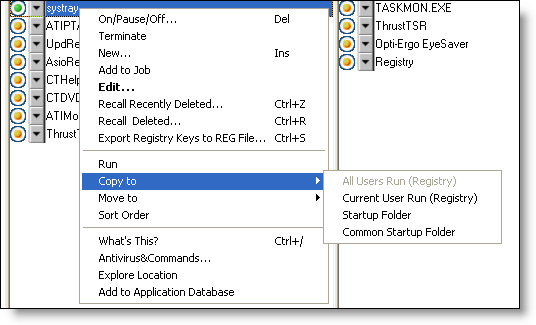
    Copy Item

    How can you specify the loading order of programs that start automatically with Windows?

    Although Microsoft says the order in which these programs load is undetermined, this is not truth.

    The Windows launcher scans the registry key and executes each program in its own anisochronous thread. The first program to load will usually be the one that appears first in the registry key.
    (Note: the delay between the first program to be started and loading of other programs is extremely short. It may be a half a second - or less - depending on a number of inter-related factors.)

    But with RegRun you can control the load order of all programs that start automatically when Windows starts.

    If you want get full control of your startup processes you can use either of these RegRun features:

    • Launch Soon;
    • Run Job.
    Both these utilities allow you to add a timed delay before any program is launched.

    Why are there two similar utilities and what is the difference between them?

    Launch Soon is a simple program launcher that enables you to add a specified time delay before an application is executed. Launch Soon processes only one application at a time. It includes a very useful option: LAUNCH ONCE PER DAY. This feature enables you to suppress a program from being started more than once in any daily session.

    Small, handy and easy to use - that's LAUNCH SOON!
    Launch Soon is included with the Standard version of RegRun.

    Run Job works with an unlimited number or applications.
    It creates its own instruction files - called JOBS.

    The Run Job interface for creating JOBS is extremely user friendly and has the same look and feel as Windows Explorer.
    When you create a new JOB you can specify any order for launching your start up programs, and you can choose either synchronous or anisochronous execution mode.
    For example, you can easily launch one application after another has finished doing its work.
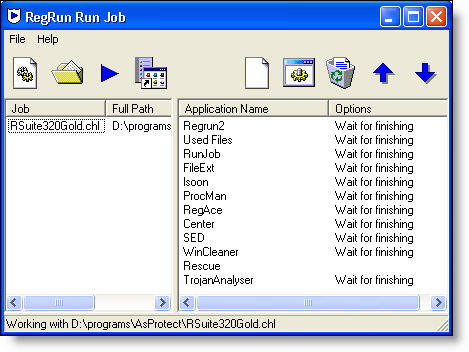
    Run Job

    You can always halt the execution of any JOB by holding down the Shift key while the JOB is running.

    This concept also applies to the RegRun Controlled Startup.

    Controlled Startup enables you to import your startup items directly into a JOB and optionally to remove all other items and/or add already created JOBS.

    If you want Windows to skip execution of the Startup programs (for instance if you need to run a Defragmentation program or you want to play a particular Game or for any other reason where you don't want Windows to load these startup programs) all you need to do is hold down the Shift key while Windows starts. Run Job will then ask you if you want to run the JOB. If you answer Yes you will boot into a clean Windows environment.

    STARTUP ORDER FOR WINDOWS 9X/ME

    1. config.sys
    2. autoexec.bat
    3. wininit.ini
    4. winstart.bat
    5. system.ini
    6. win.ini
    7. All Users-RunOnce
      HKEY_LOCAL_MACHINE\Software\Microsoft\Windows\CurrentVersion\RunServicesOnce
    8. All Users-RunServices
      HKEY_LOCAL_MACHINE\Software\Microsoft\Windows\CurrentVersion\RunServices
    9. All Users-RunOnce
      HKEY_LOCAL_MACHINE\Software\Microsoft\Windows\CurrentVersion\RunOnce
    10. All Users-Run
      HKEY_LOCAL_MACHINE\Software\Microsoft\Windows\CurrentVersion\Run
    11. All Users-RunOnceEx
      HKEY_LOCAL_MACHINE\Software\Microsoft\Windows\CurrentVersion\RunOnceEx
    12. All Users-RunEx
      HKEY_LOCAL_MACHINE\Software\Microsoft\Windows\CurrentVersion\RunEx
    13. Current User-RunOnce
      HKEY_CURRENT_USER\Software\Microsoft\Windows\CurrentVersion\RunOnce
    14. Current User-Run
      HKEY_CURRENT_USER\Software\Microsoft\Windows\CurrentVersion\Run
    15. Current User-RunOnceEx
      HKEY_CURRENT_USER\Software\Microsoft\Windows\CurrentVersion\RunOnceEx
    16. Current User-RunEx
      HKEY_CURRENT_USER\Software\Microsoft\Windows\CurrentVersion\RunEx
    17. Common Startup Folder
    18. Startup Folder

    STARTUP ORDER FOR WINDOWS NT4/2000/XP

    1. BootExecute
      HKLM\SYSTEM\CurrentControlSet\Control\Session Manager\BootExecute
    2. Services
    3. User enters a password and logon to the system
    4. UserInit
      HKLM\SOFTWARE\Microsoft\Windows NT\CurrentVersion\Winlogon\UserInit
    5. Shell
      HKLM\SOFTWARE\Microsoft\Windows NT\CurrentVersion\Winlogon\Shell
    6. All Users-RunOnce
      HKEY_LOCAL_MACHINE\Software\Microsoft\Windows\CurrentVersion\RunOnce
    7. All Users-Run
      HKEY_LOCAL_MACHINE\Software\Microsoft\Windows\CurrentVersion\Run
    8. All Users-RunOnceEx
      HKEY_LOCAL_MACHINE\Software\Microsoft\Windows\CurrentVersion\RunOnceEx
    9. All Users-RunEx
      HKEY_LOCAL_MACHINE\Software\Microsoft\Windows\CurrentVersion\RunEx
    10. Current User-RunOnce
      HKEY_CURRENT_USER\Software\Microsoft\Windows\CurrentVersion\RunOnce
    11. Current User-Run
      HKEY_CURRENT_USER\Software\Microsoft\Windows\CurrentVersion\Run
    12. Current User-RunOnceEx
      HKEY_CURRENT_USER\Software\Microsoft\Windows\CurrentVersion\RunOnceEx
    13. Current User-RunEx
      HKEY_CURRENT_USER\Software\Microsoft\Windows\CurrentVersion\RunEx
    14. Common Startup Folder
    15. Startup Folder

    Buy Now! Purchase RegRun

    Read more information...


    Would you like to add your opinion?

    Your Name (Not Required):

    Your E-mail to contact (Not Required):


    Description:

  • What's new?

    September 29 2008
    Updated RegRun Reanimator - freeware software for detecting and removing rootkits/malware.

    September 17 2008
    Updated RegRun Reanimator - freeware software for detecting and removing rootkits/malware.

    September 8 2008
    Windows Explorer Redirection DLLS is a new dangerous Windows startup hole...

    September 4 2008
    Updated RegRun Reanimator - freeware software for detecting and removing rootkits/malware.

    August 28 2008
    Updated RegRun Reanimator - freeware software for detecting and removing rootkits/malware.

    July 22 2008
    RegRun Platinum Ukrainian 5.80

    July 18 2008

    RegRun 5.8 release
    Free for registered users! Download

    June 5 2008
    RegRun has been reviewed by 3d2f.com Software Directory: RegRun Security Suite is an excellent tool that will reliably protect you from a plethora of existing and emerging threats and will keep malware at bay.

    March 7 2008
    Partizan.exe is not a worm. Partizan.exe is a part of RegRun Suite, UnHackMe antirootkit. Updated. Symantec fixed false positive.

    February 14 2008
    Happy Valentine's day!
    RegRun 5.7 released

    February 11 2008
    Spyware Doctor false positive. Partizan.sys wrong detection.

    What is spXX.sys?

    January 28 2007
    Removing Medichi Rootkit

    October 26 2007
    Removal of Noskrnl.exe and Noskrnl.sys Rootkit (Spooldr clone)

    July 25 2007
    Removal Baidu rootkit (cnprov.sys)

    July 24 2007
    Removal Spooldr(ecard.exe) rootkit

    June 25 2007
    Fixing BSOD
    in Winlogon Process

    June 4 2007
    Removal Areses Trojan

    May 25 2007
    Virus Feebs rootkit removal story

    RegRun 5.5 beta updated

    Release RegRun Reanimator 5.5.5.900

    April 5 2007
    What's this? Rthdcpl.exe - Illegal System DLL Relocation...

    March 1 2007
    Warning! Rootkit Unhooker

    February 9 2007
    Read our article about Unreal rootkit...

    December 28 2006
    Released free Rustock Rootkit(lzx32.sys) removal tool

    November 29 2006
    A#######.sys is a rootkit?

    September 8 2006
    Rootkit Removal instructions: ntsystem.exe

    April 24 2006
    What is BDGuard.sys?

    April 17 2006
    Virus or not? SPTD####.sys

    March 31 2006
    What is mc21.tmp, mc22.tmp, mc23.tmp?

    January 19 2006
    ICQCHK.exe, MSX.DLL free remover...
    Educational discount...

    Services
    Ask Computer Guys

    Windows startup programs

    Articles
    Using Registry Tracer...

    RegRun against Trojans and Viruses

    Specify an order for startup programs

    RunGuard prevents a launch...

    Using Bootlog Analyser...

    They say
    "RegRun Security Suite is one of those very rare tool kits that no one who is serious about protecting their PC should ever be without. This toolkit covers all the bases when it comes to eradicating the attempted security threats from malware that we all face - daily. The near real time tech support, direct from Greatis, is nothing sort of superb, something that can be rarely said these days! I have no hesitation in recommending this suite to anyone."

    Miles Pearson

    Wilders.ORG. Security advisors recommend...

    Testimonials
    You guys are awesome!!!!
    Traci www.pentagonattack911.com

    Bob Schmulian:
    Absolutely love it and have recommended to many people!

    Ian Robinson:
    It is FANTASTIC! It has saved my life on more than one occasion since I purchased it less than 6 months ago. I now would not run my system without it... it's worth many times the cost! The service and support are terrific. Helpful - friendly - and accommodating; and generally a reply is received within 12 hours. Just great.

    Theodore Soucie:
    Since RegRun was installed my system is more stable. I use to experience freezeup daily. I have not had a crash.

    Awards
    Paul's Picks
Shareware Winner  

    More...


    Greatis Software Greatis | Security | AppDatabase | Utilities | Delphi/CB | Visual Basic | .NET | just4fun

    Contacts | Add to Favorites | Recommend to a Friend | Privacy Policy | Copyright © 1998-2008 Greatis Software