Why Is It Dangerous?
Negative Signals
- Seen in the wild: Notification permission for this site in the browser settings found on 10+ PCs checked by UnHackMe.
- What we observed: Sends fake virus alerts as browser notifications
- Matched a UnHackMe Security Team signature.
- Domain was registered on September 2, 2026 (47 days before the check).
The verdict covers this exact address.
What It Looks Like
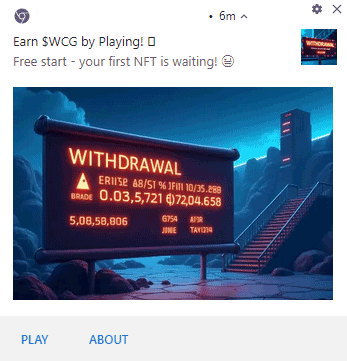
Possible Risks of Push Notification Spam
Harm level: medium
- Endless notifications with fake virus alerts, even when the site is closed.
- Scam, gambling and adult ads.
- Links to fake "cleaners", unwanted programs and malware downloads.
- Phishing pages that ask for passwords or card details.
General risks of this kind of site. What was found for this site is described above.
If You Already Opened This Site
You clicked "Allow"
The site can send you notifications at any time, even when it is closed. Links in them may lead to new infections. Block its notifications as soon as possible (see below), and do not click them meanwhile.
- If you allowed notifications: block vlvk-adguard.co.in in your browser's notification settings.
- If you clicked a notification and installed something: remove it and scan your PC.
- If you entered a password or card details after a notification: change the password and call your bank.
You did not click "Allow"
You are probably not infected. To be sure, check your PC for malware.
How to Remove vlvk-adguard.co.in
Scan Your PC
Malicious notifications can lead to other infections. Scan your computer for malware, unwanted programs and browser threats.
Scan with UnHackMe For Windows PCs · free 30-day trial
Pros and cons
Pros
- A full check of your PC for malware that your antivirus may miss.
- Free for 30 days, with no limits. After the trial, it keeps finding threats; removing them needs a license.
- Help in Removal from UnHackMe experts is free too: a person answers within 24 hours.
- Checks browsers, Windows startup, services, shortcuts and more.
Cons
- You need to install a program.
- Windows only.
- After the trial, a license is needed.
Need help? Click Help in Removal in UnHackMe. Help in RemovalThe UnHackMe team helps you remove it. Free during the 30-day trial.Help in Removal…
Remove Notifications Manually
Revoke the site's notification permission in your browser. This stops unwanted notifications but does not remove other possible infections.
Follow the guide for your browser:
Pros and cons
Pros
- Blocking one site takes a minute.
- Nothing to install.
Cons
- You need to check every browser on your PC and every browser profile (some people have ten or more), so most people need much longer.
- Stops this site only: other sites or programs that show ads need checking too.
Technical Details
Registration
- Registered: September 2, 2026
- Registration expires: September 2, 2027
- Registrar: NAMECHEAP
- Registrant country: KZ
- First seen by IntelDB: October 19, 2026
Hosting
- IP address: 172.64.80.1
- IP addresses: 2
- CDN network (ASN): AS13335
- CDN network country (origin server hidden): US
- Hosting type: cdn
- Proxy / CDN: cloudflare
Certificate and DNS
- Name servers: cloudflare
- HTTPS: Yes
- Certificate issuer: Let's Encrypt
- Certificate type: DV
- First certificate: September 2, 2026
- Certificates in public logs: 4
- Any subdomain resolves (wildcard DNS): Yes
Page and search
- Search results (up to 5 checked): 1
- Page answer (HTTP): 404
What Was Checked
- Registration
- DNS
- Certificates
- Page inspection
- Search engines
- Threat lists and signatures
- UnHackMe reports
Timeline
- September 2, 2026Domain registered
- October 19, 2026First seen by IntelDB
- October 20, 2026Verdict: dangerous
- October 20, 2026Last checked
Last checked October 20, 2026 · Report updated November 22, 2026 · Data: Greatis Software IntelDB
Why Is It Dangerous?
Negative Signals
- Seen in the wild: Notification permission for this site in the browser settings found on 10+ PCs checked by UnHackMe.
- What we observed: Sends fake virus alerts as browser notifications
- Matched a UnHackMe Security Team signature.
- Domain was registered on September 2, 2026 (47 days before the check).
The verdict covers this exact address.
If You Already Opened This Site
You clicked "Allow"
The site can send you notifications at any time, even when it is closed. Links in them may lead to new infections. Block its notifications as soon as possible (see below), and do not click them meanwhile.
- If you allowed notifications: block vlvk-adguard.co.in in your browser's notification settings.
- If you clicked a notification and installed something: remove it and scan your PC.
- If you entered a password or card details after a notification: change the password and call your bank.
You did not click "Allow"
You are probably not infected. To be sure, check your PC for malware.
Technical Details
Registration
- Registered: September 2, 2026
- Registration expires: September 2, 2027
- Registrar: NAMECHEAP
- Registrant country: KZ
- First seen by IntelDB: October 19, 2026
Hosting
- IP address: 172.64.80.1
- IP addresses: 2
- CDN network (ASN): AS13335
- CDN network country (origin server hidden): US
- Hosting type: cdn
- Proxy / CDN: cloudflare
Certificate and DNS
- Name servers: cloudflare
- HTTPS: Yes
- Certificate issuer: Let's Encrypt
- Certificate type: DV
- First certificate: September 2, 2026
- Certificates in public logs: 4
- Any subdomain resolves (wildcard DNS): Yes
Page and search
- Search results (up to 5 checked): 1
- Page answer (HTTP): 404
About
Remove
How to Remove vlvk-adguard.co.in
Scan Your PC
Malicious notifications can lead to other infections. Scan your computer for malware, unwanted programs and browser threats.
Scan with UnHackMe For Windows PCs · free 30-day trial
Pros and cons
Pros
- A full check of your PC for malware that your antivirus may miss.
- Free for 30 days, with no limits. After the trial, it keeps finding threats; removing them needs a license.
- Help in Removal from UnHackMe experts is free too: a person answers within 24 hours.
- Checks browsers, Windows startup, services, shortcuts and more.
Cons
- You need to install a program.
- Windows only.
- After the trial, a license is needed.
Need help? Click Help in Removal in UnHackMe. Help in RemovalThe UnHackMe team helps you remove it. Free during the 30-day trial.Help in Removal…
Remove Notifications Manually
Revoke the site's notification permission in your browser. This stops unwanted notifications but does not remove other possible infections.
Follow the guide for your browser:
Pros and cons
Pros
- Blocking one site takes a minute.
- Nothing to install.
Cons
- You need to check every browser on your PC and every browser profile (some people have ten or more), so most people need much longer.
- Stops this site only: other sites or programs that show ads need checking too.